


Download Animation Addons Pro 2.5.4 – Animation Plugin for WordPress
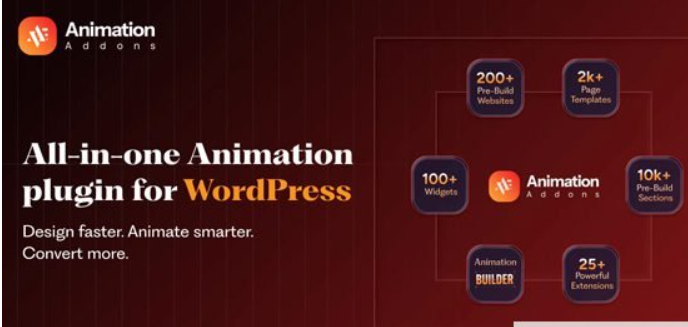
Animation Addons Pro 2.5.4 is the ultimate Elementor animation plugin powered by GSAP (GreenSock Animation Platform). Create stunning scroll-triggered animations, text effects, SVG animations, parallax scrolling, and motion effects without writing code. Includes 40+ pre-built widgets, custom animation builder, ready-made templates, and responsive design controls perfect for designers, agencies, and WordPress users. Preview
Transform Your WordPress Site with Professional Elementor Animations
Static websites are boring. Visitors expect interactive, engaging experiences that capture attention and guide them through your content. Animation Addons Pro 2.5.4 delivers exactly that—a powerful Elementor animation plugin that turns ordinary pages into visually stunning, scroll-responsive masterpieces.
Built on GSAP (GreenSock Animation Platform), the industry-standard animation library used by top brands worldwide, Animation Addons Pro brings professional-grade motion effects to WordPress without requiring any coding knowledge.
Why Animation Addons Pro 2.5.4 is the Best Elementor Animation Plugin
GSAP-Powered Performance
Unlike CSS-based animation plugins that struggle with complex sequences, Animation Addons Pro uses GSAP for silky-smooth, high-performance animations that work flawlessly across all browsers and devices. GSAP ensures your Elementor animations load quickly, run smoothly, and never bog down your site.
Visual Animation Builder – No Coding Required
The custom animation builder lets you design complex animation sequences using an intuitive visual interface inside Elementor. Adjust timing, duration, easing, triggers, and effects with simple controls—no JavaScript or CSS knowledge needed.
40+ Pre-Built Animation Widgets
Save hours with ready-to-use animated widgets including:
-
Stacked Cards with animated transitions
-
ScrollMotion Cards for storytelling
-
Advanced Portfolio with filter animations
-
Nested Sliders with multi-layer effects
-
Event Sliders and Content Sliders
-
Countdown timers with dynamic effects
-
Vertical Marquee for continuous scrolling
-
Toggle Switchers with smooth transitions
-
Floating Elements with zoom and rotation
25+ Animation Extensions
Apply scroll-triggered animations to any Elementor section, column, or widget with one-click extensions including:
-
ScrollTrigger animations
-
Parallax effects
-
Pin elements while scrolling
-
Horizontal scroll animations
-
Mouse move effects
-
Cursor hover animations
-
Image reveal on scroll
-
Text move and invert effects
Core Features of Animation Addons Pro 2.5.4
Advanced Scroll Animations
ScrollTrigger Integration
Control exactly when animations start, pause, or reverse based on scroll position. Create cinematic scrolling experiences where elements fade in, slide across, scale up, or transform as visitors move down the page.
Scroll Smoother
Add buttery-smooth scrolling to your entire site with GSAP’s ScrollSmoother integration. This creates a premium, app-like feel that enhances user experience and keeps visitors engaged longer.
Pin Elements
Pin sections, images, or text in place while other content scrolls past. Perfect for highlighting key messages, creating split-screen effects, or building immersive storytelling layouts—all without coding.
Horizontal Scroll Effects
Break free from vertical scrolling. Create horizontal scroll galleries, timelines, or product showcases that activate as users scroll down the page.
Text Animation Effects
SplitText Animations
Animate text by character, word, or line with staggered effects. Create dramatic headline reveals, flowing paragraphs that appear letter-by-letter, or call-to-action text that spins into view.
Text Move & Reveal
Slide, fade, scale, invert, or uncover text as users scroll. Add depth to your typography with 3D spin effects, layered reveals, and customizable motion paths.
Scramble Text Effect
Add dynamic, glitchy text effects that grab attention. Perfect for tech brands, portfolios, or any site wanting a modern, digital aesthetic.
SVG & Vector Animations
DrawSVG Animation
Animate SVG strokes to draw logos, icons, or illustrations on screen as visitors scroll. Create signature effects, animated infographics, or brand reveals.
MorphSVG
Transform one SVG shape into another with smooth morphing animations. Ideal for logo transitions, icon animations, or creative visual storytelling.
Motion Path Animation
Make elements follow custom paths across the screen. Animate objects along curves, circles, or complex routes for unique motion effects.
Image & Visual Effects
Image Reveal on Scroll
Images appear gradually as visitors scroll, creating focus and enhancing storytelling. Control scale, fade, and stretch effects for each image.
Image Hover Reveals
Display alternate product images, zoomed details, or additional content when users hover over images. Perfect for e-commerce, portfolios, and interactive galleries.
Image Sequence Animation
Create frame-by-frame animations using image sequences. Build scroll-controlled video effects, product demos, or cinematic transitions.
Clip Path Animation
Reveal images or content using animated clip paths. Create unique entrance effects, masked reveals, or shaped transitions.
Interactive Effects
Cursor Move Effect
Elements respond to mouse movement in real time with customizable X and Y axis controls. Create playful, interactive experiences that encourage exploration.
Custom Cursor Effects
Replace default cursors with animated custom designs. Add interactive elements that follow the mouse for a premium, branded experience.
Draggable Elements
Make any Elementor element draggable by visitors. Perfect for interactive portfolios, product comparisons, or gamified experiences.
Lottie Animation Integration
Import and control Lottie animations directly in Elementor. Use lightweight, scalable vector animations for icons, illustrations, and micro-interactions without compromising performance.
Parallax & 3D Effects
Multi-Layer Parallax
Create depth with multiple parallax layers moving at different speeds. Perfect for hero sections, backgrounds, and immersive storytelling.
3D Transformations
Add 3D rotations, scaling, and perspective effects to any element. Create card flips, product showcases, or dimensional interfaces.
Advanced Animation Controls
Customizable Triggers
Choose when animations activate:
-
On page load
-
On scroll position
-
On hover or click
-
At specific viewport positions
-
Based on element visibility
Precise Timing Controls
Set custom delays, durations, and easing functions for each animation. Stagger multiple elements for sequential reveals or create complex choreographed sequences.
Responsive Animation Settings
Customize animations separately for desktop, tablet, and mobile devices. Ensure your Elementor animations look perfect on every screen size.
Loop & Reverse Options
Set animations to loop infinitely, reverse on scroll, or play once. Full control over animation behavior.
Pre-Built Templates & Layouts
Animation Addons Pro includes professionally designed templates featuring advanced animations you can import and customize:
-
Landing pages with scroll effects
-
Portfolio layouts with filter animations
-
Product showcases with interactive reveals
-
Hero sections with parallax backgrounds
-
One-page scroll websites
Import any template, swap your content, and adjust animations to match your brand—no design skills required.
Performance & Compatibility
Lightweight & Optimized
Despite powerful features, Animation Addons Pro maintains fast load times through optimized code and on-demand asset loading. Animations enhance user experience without sacrificing speed.
Cross-Browser Compatible
GSAP-powered animations work flawlessly across Chrome, Firefox, Safari, Edge, and mobile browsers. Your Elementor animations look consistent everywhere.
Conflict-Free Design
Built to work seamlessly with other Elementor addons, WordPress themes, and plugins. Regular updates ensure compatibility with the latest WordPress and Elementor versions.
Who Should Use Animation Addons Pro 2.5.4?
Web Designers & Agencies
Create stunning client websites with professional animations that justify premium pricing. Deliver modern, interactive designs faster with pre-built widgets and templates.
E-commerce Store Owners
Boost conversions with animated product reveals, interactive hover effects, and scroll-triggered calls-to-action. Guide customers through your sales funnel with engaging motion.
Portfolio & Creative Professionals
Showcase your work with animated portfolios, image galleries with reveal effects, and scroll-based storytelling that keeps visitors engaged.
Bloggers & Content Creators
Break up long-form content with animated elements, parallax backgrounds, and text effects that make reading more enjoyable and shareable.
Business Websites
Build professional corporate sites with subtle animations that enhance usability, guide attention, and create memorable brand experiences.
SEO Friendly & AdSense Safe
Search Engine Optimized
Animation Addons Pro uses clean, semantic code that doesn’t interfere with SEO. Animations enhance user engagement metrics like time on page and bounce rate—positive ranking signals for Google.
Step one
– Click on download link and go to Website,
Step Two-
Click Download button. It contains ads so click 3-4 times then download would be started.

Step 3-
Extrat the folder
Step 4-
you will see folders like this 3 folders
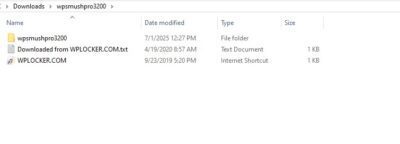
- outer folder


- main folder

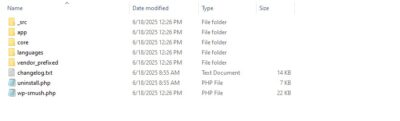
- innermost folder

Step five. final –
you have to zip second folder (main folder) and upload it in wordpress
*if you find it difficult just extract go till the inner most folder where you find files like src, main, css etc. these are plugins file just come one folder back and zip that folder *
Related products


Download Unlimited Elements Pro : Ultimate Elementor Toolkit

Download WPForms Pro – WordPress Form Builder Plugin with


Elite Licenser v2.4.5 – Powerful Software License Manager & Product Updates for WordPress


Tutor LMS Pro v3.9.2- Download Now Plugin Adda
Tutor LMS Pro v3.9.2 is a premium WordPress plugin built to create, manage, and sell online courses professionally. With its drag-and-drop course builder, advanced dashboard, quizzes, certificates, and instructor management, it makes eLearning seamless and scalable. Preview
Reviews
There are no reviews yet.