


Advanced iFrame Pro -download online
₹0.00
Advanced iFrame Pro: Include content the way YOU like in an iframe that can hide and modify elements and forward parameters. You can also embed content directly or show a part of an iframe
.

Advanced iFrame Pro lets you embed content in an iframe with complete control — you can hide or modify elements, forward parameters, or even display only a specific section of the iframe. You also have the option to embed content directly into your site.
Please review the quickstart documentation before buying to understand which features apply to your setup.
For example:
-
To resize iframe content or modify CSS on a remote page, you must add a single line of JavaScript to the remote page.
-
HTTP pages cannot be embedded inside HTTPS pages.
-
Basic HTML/CSS skills are recommended for identifying and working with elements on your site.
Key Features & Benefits of Advanced iFrame Pro
-
Same-domain or External Workaround: If hosted on the same domain (or with the external workaround enabled), you can auto-resize the iframe to match its content, detect dynamic changes, and support hidden element auto-height adjustments.
-
Partial Content Display: Even without access to the external page code, you can display only a specific portion of the iframe using the included area selector. This tool lets you hide unwanted sections and integrate with zoom support.
-
Zoom Options: Fixed-ratio zoom and auto-zoom (based on browser size) are supported—ideal for making non-responsive pages mobile-friendly.
-
CSS Control: Dynamically update the parent page’s CSS and, in some cases, the advance iframe pro page itself—perfect for hiding headers/footers or improving responsiveness.
-
Lazy Loading: Load the main page first, then the iframe—only when it becomes visible or on a user’s click—to improve performance.
-
Loading Icons: Show a loading spinner until the iframe finishes loading.
-
Responsive Support: Multiple methods to make iframes responsive, including video support.
-
Device-Specific Display: Show different iframes or sections based on the visitor’s device using built-in browser detection.
-
Custom Link Targets: Modify link behavior within both the parent and iframe page so external links open in a dedicated iframe layer instead of navigating away.
-
iOS Scrolling Fix: Includes a specific workaround for iOS iframe scrolling issues, with browser detection to ensure compatibility.
-
Parameter Parsing: Forward parameters from the parent page, use placeholders (e.g., current WordPress username), and add the iframe URL as a parameter for bookmarking.
-
Widget Support: Insert iframes or any shortcode into widget areas.
-
Content Sharing: Offer portions of your site with just two lines of code using the “content filter” and
ai_external.jssolution. -
Iframe Checker: Monitors all your iframes daily—whether or not they were created with Advanced iFrame—to ensure they still load correctly.
-
PHP Compatibility: Works with any PHP page, not just WordPress.
-
Cookie Workaround: Fixes third-party cookie issues in Safari, IE, and other browsers that block iframe cookies.
-
Gutenberg Block: Easily add iframe previews directly within the block editor.
Loading iframes often takes additional time. So now you can show your users a loading icon until the iframe is fully loaded.
Compatibility Checks Before Embedding
-
Test inclusion permission: Use the free iframe checker: advance Iframe pro Checker Tool.
-
Domain matching: Ensure the parent and iframe are on the same domain (subdomains are considered different).
-
Modifications: If the iframe is from a different domain and you want resizing or CSS edits, add the provided JavaScript line to the remote page.
-
HTTPS rules: You cannot mix HTTPS parent pages with HTTP iframes on most modern browsers.
Installation of Advanced iFrame Pro
-
Upload the plugin via the WordPress plugin installer or manually place the
advanced-iframefolder in/wp-content/plugins/. -
Activate it through the Plugins menu.
-
Use
[advanced_iframe]in pages or posts. Security key is found under Settings → Advanced iFrame Pro..
Step one
– Click on download link and go to Website,
Step Two-
Click Download button. It contains ads so click 3-4 times then download would be started.

Step 3-
Extrat the folder
Step 4-
you will see folders like this 3 folders
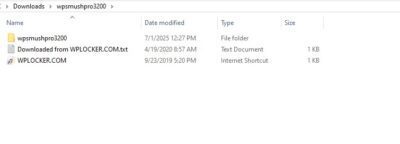
- outer folder


- main folder


- innermost folder

Step five. final –
you have to zip second folder (main folder) and upload it in wordpress
*if you find it difficult just extract go till the inner most folder where you find files like src, main, css etc. these are plugins file just come one folder back and zip that folder *
Related products

All-in-One WP Migration Unlimited Extension(Bundle)

Chaty Pro v3.4.6 – Floating Chat Widget, Contact Icons, Email, SMS, Call Button Title

Download Cost Calculator Builder PRO v3.5.29 – Complete WordPress Pricing Solution




WooCommerce Product Builder – (Custom PC Builder)

WP Content Copy Protection Pro
Prevent users from copying text or saving images by disabling right-click and content selection. Take full control over your site’s protection. Download wp migration extenion free
Reviews
There are no reviews yet.